Our system supports a Split Payment feature that allows invoices for a child to be divided between parents. This feature must be configured at the child profile level before it can be applied to invoices.
Setting Up Split Payments
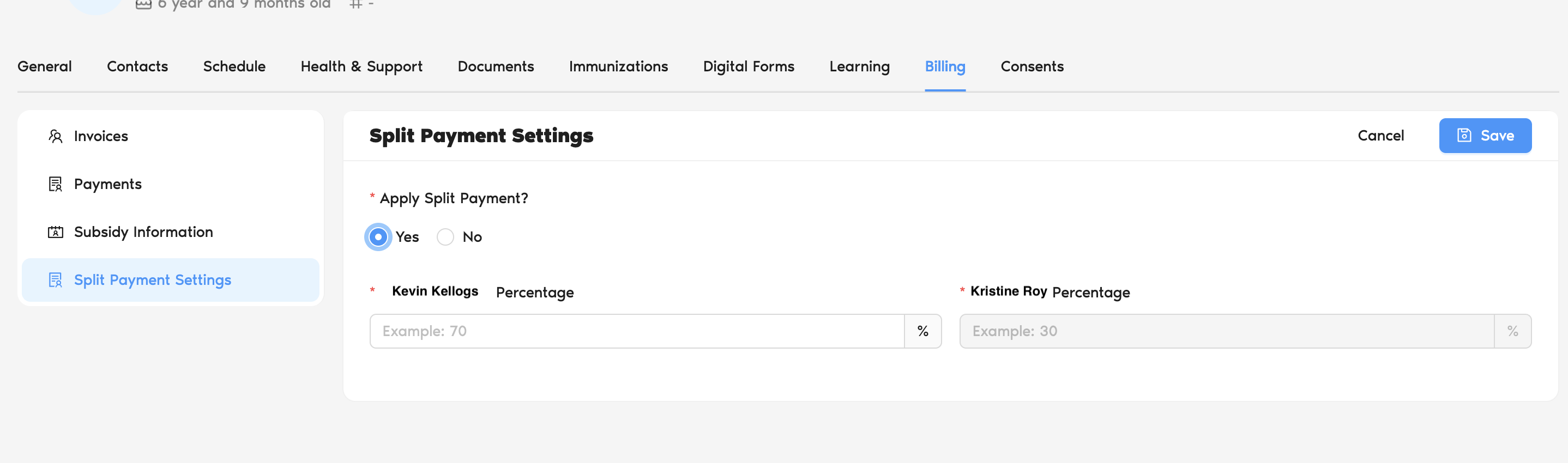
To enable split payments:
- From the main dashboard, go to My Centre and then click on Children
- Click on the name of the child for whom you want to set up split billing
- Inside the child's profile, click on the Billing tab located in the top menu.
- From the sub-menu on the left side of the Billing screen, select Split Payment Settings
- In the "Apply Split Payment?" section, select Yes
- Enter the specific percentage of the total fee that each parent or guardian is responsible for (for example, 50% for one parent and 50% for the other)
⚠️ Note: Split payments can only be set using percentages. Fixed dollar amounts are not supported. - Click the Save button in the top-right corner to finalize the shared responsibilities
How Split Payments Work
- Once split payment is configured, the system will automatically apply the split when generating invoices.
- The Split Between Parents flag determines whether an invoice is shared between parents.
- Enabled: The invoice is split according to the child’s split payment setup, and separate invoices are generated for each parent. Each parent will receive their assigned percentage of the total amount.
- Disabled: The invoice is sent only to the primary parent. The secondary parent will not receive the invoice.
- If an invoice is split:
- Two separate invoices will be generated.
Was this article helpful?
That’s Great!
Thank you for your feedback
Sorry! We couldn't be helpful
Thank you for your feedback
Feedback sent
We appreciate your effort and will try to fix the article