If a parent has not yet completed the enrollment package, you can send them a reminder directly from the Admissions page. This allows you to remind families without manually composing or sending an email.
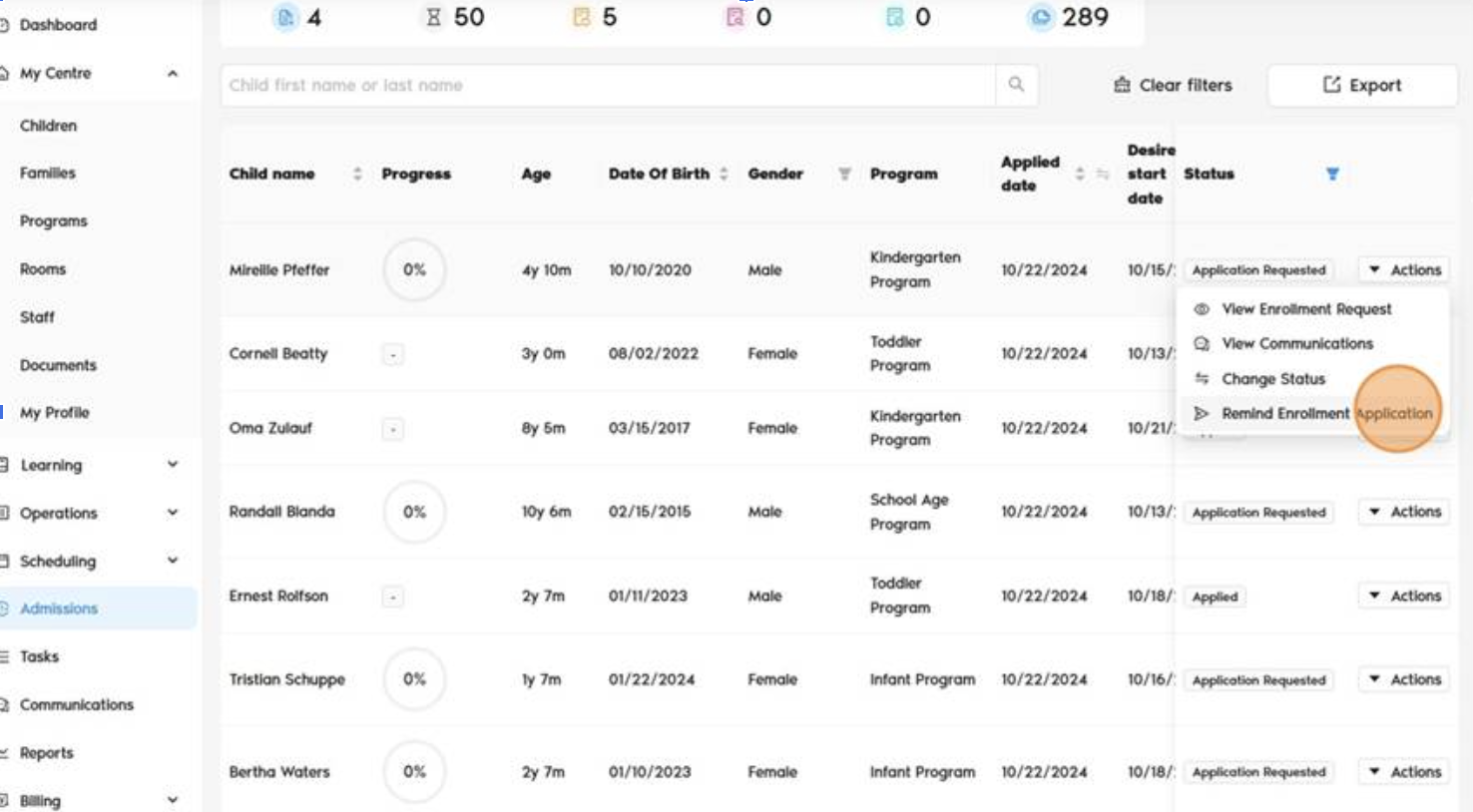
- Open the Admissions page from the main menu.
- In the Admissions list, locate the child whose enrollment package is still incomplete. You can use the search box or filters to quickly find the child if needed.
- Click Actions next to the child's name.
- Select Remind Enrollment Application.
The system will automatically send a reminder email to the parent associated with the enrollment application, asking them to complete the enrollment package.
✉️ What Happens Next?
- An email reminder is automatically sent to the family.
- No manual email writing or follow-up is required.
- This helps ensure timely completion of enrollment steps.
? Tips
- Use this feature for applications stuck in “Application Requested” or "Application Incomplete" status.
- You can send reminders multiple times if needed.
- Combine with status tracking to manage follow-ups efficiently.
Was this article helpful?
That’s Great!
Thank you for your feedback
Sorry! We couldn't be helpful
Thank you for your feedback
Feedback sent
We appreciate your effort and will try to fix the article